|
Posted: 30 Nov 2014 07:19 PM PST
Samsung GT-I8190 Battery Connecter Ways Jumper Problem Solution
This
Solution Is For Battery Low Then Power Off Problem In Samsung Galaxy S3
Mini I8190 And Also U Will Find Power Button Ways And Jumper
Information In Following Post.
After
Disassambly Of Samsung GT-I8190 Look At The Motherboard For Rust Carbon
Or Burren Parts. If You Found Some Rust Or Carbon Apply Electronics
Cleaner On The Mother Board And Apply Hot Air To Make It Dry Proper.
If
a leg or two of the connector is broken just replace the whole battery
connector with a new one. If the prints of the Samsung Galaxy S3 Mini
I8190 battery connector are broken then you need to make the jumpers to
the connecting points as shown in the diagram below.
Here Are The Solution Please Ovserve Carefully.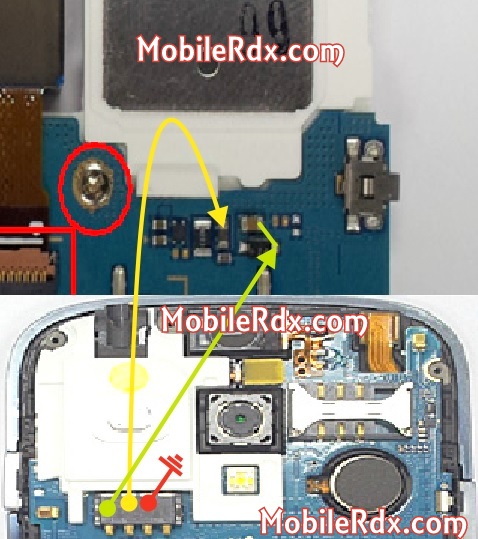 Note: Please note that even though every solution posted on out website is tested by one or more members of our team before posting, but still we do not take any responsibility for any damage it may cause to your cell phones. Use these repairing solutions at your own risk. Thank You. The post Samsung GT-I8190 Battery Connecter Problem Jumper Solution appeared first on MobileRdx.com.  |
|
Posted: 30 Nov 2014 02:01 AM PST
Samsung
GT-I8190 Volume Button Ways Up Down Key Jumper Solution-In this post we
will try to discuss the damage to the volume button on Samsung Galaxy
S3 Mini I8190, damage to the volume knob often occurs due to the volume
button is broken or not functioning properly. If you press the button
voloume very hard course will ruin even make the volume slip out of
place. Here are the steps that should be done to solve the problems on
the volume button Samsung Galaxy S3 Mini.
So if your Samsung I8190 power button is not working to repair it you just need to replace it with a new one. If the prints of the button are damaged then you are going to have to make the jumpers as shown in the diagram. The first step that should be done is to check whether the volume is key there is damage or not, if there is damage to try to replace the volume button. If the button is not there a problem, try the next step.
The
second step is to check the path of the volume button, if there is a
path-breaking or not, if there is a path-breaking try to do the jumper
as shown in the picture below.
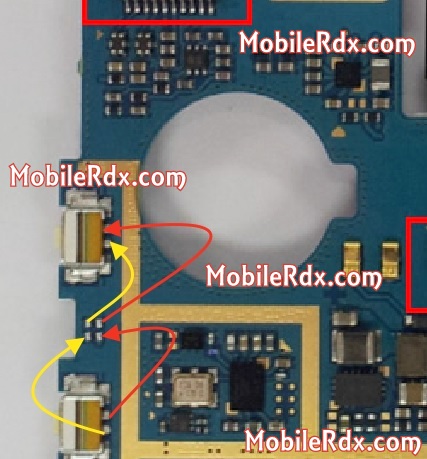 Samsung I8190 Volume Button Ways,Not Working Problem,Volume Button Jumper,Up Down Button Jumper Ways Solution.
The post Samsung Galaxy S3 Mini I8190 Volume Button Ways appeared first on MobileRdx.com.
 |
Comments
Post a Comment