Samsung Galaxy S4 I9500 Camera Problem Jumper Solution
Samsung GT-I9500 Camera Solution Jumper problem Ways
One of the things that make the Samsung Galaxy S4 I9500 distinctive from other smartphone front camera, but what happed if your front camera no longer works or responds? That would certainly be a shock for everyone.
Samsung GT-I9500 Camera Solution Jumper problem Ways
One of the things that make the Samsung Galaxy S4 I9500 distinctive from other smartphone front camera, but what happed if your front camera no longer works or responds? That would certainly be a shock for everyone.
Camera
is not taking pictures after you press camera button on screen and this
is touch screen problem, and it has nothing to do with Samsung Galaxy
S4 GT-I9500 front camera.
In the following lines you will get to know the method to fix Samsung Galaxy S4 I9500 front camera. Both Manual as well as hardware methods are mentioned in detail and in step by step method.
In the following lines you will get to know the method to fix Samsung Galaxy S4 I9500 front camera. Both Manual as well as hardware methods are mentioned in detail and in step by step method.
Try To Replace His Camera Module
Check One By One Of His Vga Camera Path.
See The Image Below:
Check One By One Of His Vga Camera Path.
See The Image Below:
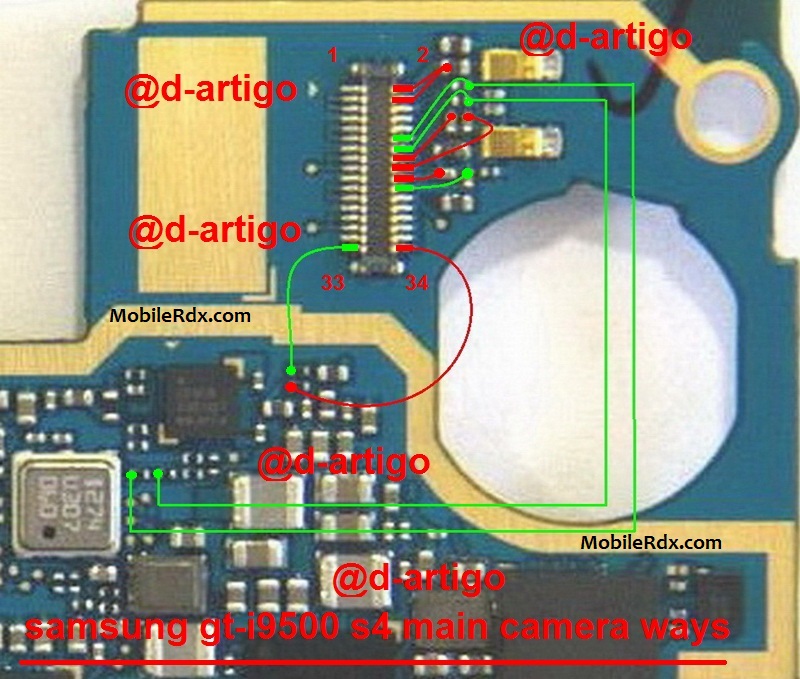
Samsung Galaxy S4 I9500 Camera Problem Jumper Solution
Samsung Galaxy S4 I9500 Camera Failed
Try To Check Its Camera Module Connection To The Camera Connector
The Mobile Phone Type Of Camera Work In:
1. Regulator Ic Camera
2. Data Path And Clock Camera
3. Emi Filter Camera
The First Third-Ic Rehot Or Replace The Camera (Green Box) And Emi Filter Camera (Yellow Box) … Replace Damaged …. And Checks His Camera Path
If you have further Questions please leave a comment.Try To Check Its Camera Module Connection To The Camera Connector
The Mobile Phone Type Of Camera Work In:
1. Regulator Ic Camera
2. Data Path And Clock Camera
3. Emi Filter Camera
The First Third-Ic Rehot Or Replace The Camera (Green Box) And Emi Filter Camera (Yellow Box) … Replace Damaged …. And Checks His Camera Path
Note: Please note that even though every solution posted on our website is tested by one or more members of our team before posting, but still we do not take any responsibility for any damage it may cause to your cell phones. Use these repairing solutions at your own risk. Thank You
The post Samsung Galaxy S4 I9500 Camera Problem Jumper Solution appeared first on MobileRdx.com.

Posted: 29 Oct 2015 05:49 AM PDT
Samsung GT-C3322 Charging Jumper Ways Solution Problem Repair
Samsung Metro Duos C3322 Charging Ways Problem Solution
Samsung Metro Duos C3322 Charging Ways Problem Solution
Tips
to fix the problem on the Samsung Metro Duos C3322 not charging,
charging not support, or Usb charging Samsung GT-C3322 does not
cooperate all, of these problems we will review and provide a way to fix
it, most likely damage the usb connector usb charging or charging lines
occur due to frequent charging plug and unplug that these problems
arise, and to track, can be problems USB charging a break point in
because release time less sophisticated charging connector to operate
the blower, or it could be because the path usb charging your Samsung
Android exposed to depleted water, and you do not immediately remove the
battery, and drying the PCB Samsung Metro Duos GT-C3322.
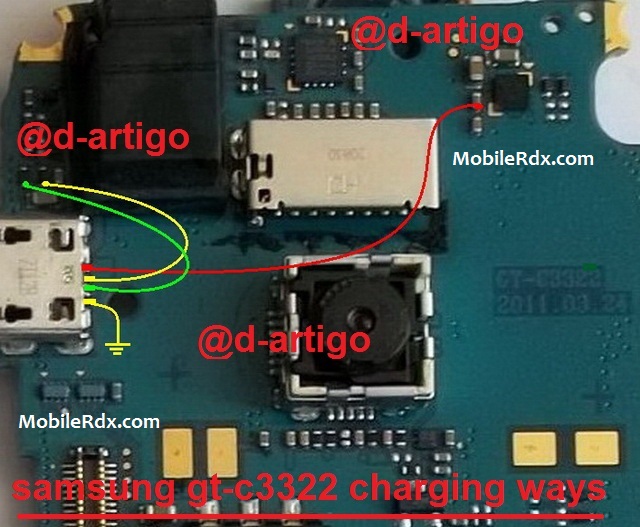
Samsung GT-C3322 Charging, Problem, Solution, Jumper, Ways
Check charging voltage with the help of multi meter. Place Negative terminal of multi meter on ground and Positive on a charging pin (1st pin from your left-hand side).
Make sure that the voltage is between 5V to 5.5V, if it is not then replace charging connector.
All of the above steps will surely help you to resolve your Nokia 5800 charging problems in the best possible manner. If you are lucky enough then simple workaround method will get the job done for you.
If you have further Questions please leave a comment.
Note: Please note that even though every solution posted on our website is tested by one or more members of our team before posting, but still we do not take any responsibility for any damage it may cause to your cell phones. Use these repairing solutions at your own risk. Thank You.
Note: Please note that even though every solution posted on our website is tested by one or more members of our team before posting, but still we do not take any responsibility for any damage it may cause to your cell phones. Use these repairing solutions at your own risk. Thank You.
The post Samsung Metro Duos C3322 Charging Ways Problem Solution appeared first on MobileRdx.com.

Comments
Post a Comment