Posted: 06 Apr 2015 04:59 AM PDT
Solutions
in this article are for Samsung Galaxy Grand 3 SM-G7102 Touch Screen
problem. If your Samsung SM-G7102 touch screen is not working diagrams
in this post can be helpful to you.
First
of all you should test that your phone’s firmware is not causing this
problem. To do that you need to access On-Device Diagnostics Tool in
your mobile phone. If you don’t know how to do that read this guide How
to Test Diagnostics in Samsung G7102.
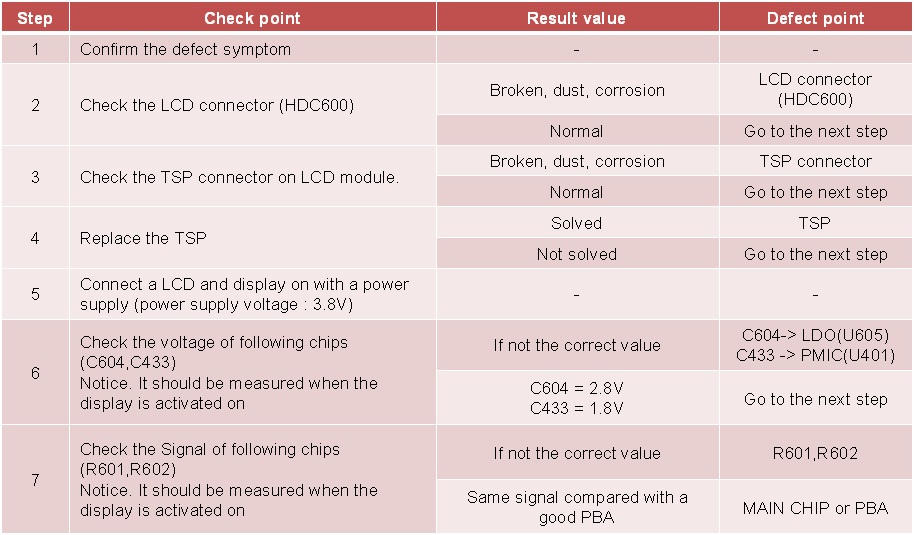
If that does not work then study this Samsung Galaxy Grand 2 G7102 Touch Screen Problem troubleshooting flowchart. Follow this flowchart and hopefully your phone will start working again.
Samsung SM-G7102 Touch Screen Troubleshooting Flowchart

Samsung SM-G7102 Touch Screen Problem Solution
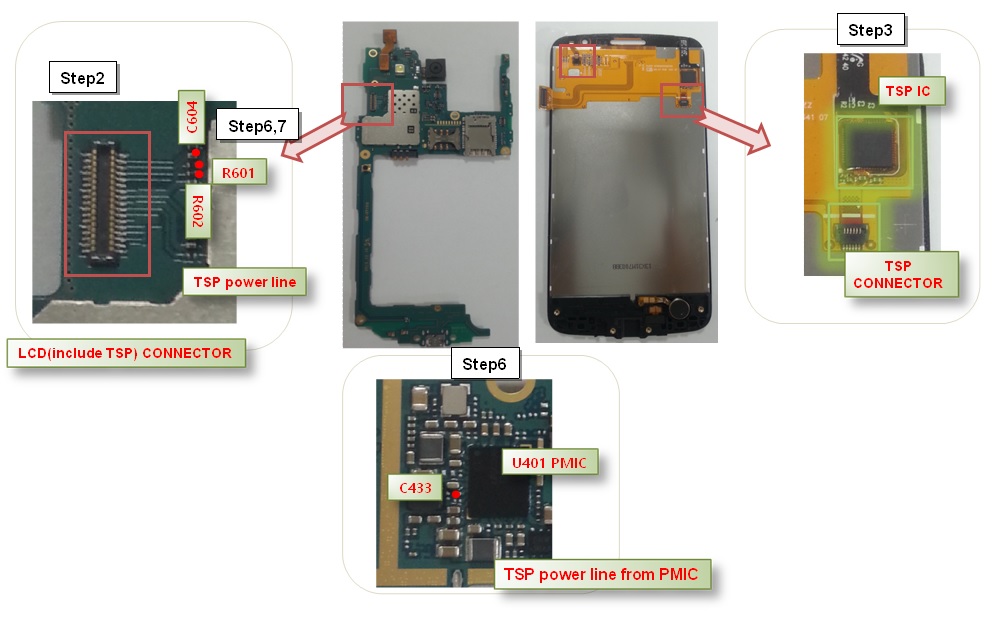
Samsung SM-G7102 Touch Screen Problem Solution
Please
Note that we will edit these solutions or add new ones if found in this
page at any time in the future. So feel free to come back any time on
this page to stay up to date.
If you have further questions please don’t hesitate to leave a comment.
Disclaimer.We
are not affiliate with cell phone company Samsung Manufacturers /
Vendors .All trademarks are the property of the respective trademark
owners.we just provide diagrams for study and repairing purpose.these
images are uploaded by website visitors.so we will not be responsible
for any loss or damage, including personal injury.for more detail read
Terms & Conditions and Privacy & Policies at bottom.
The post Samsung SM-G7102 Touch Screen Problem Solution appeared first on MobileRd
Comments
Post a Comment