Samsung GT-S6810 Power Button Ways On Off Key Jumper Solution
The
Reason for this problem could be anything. This could either be due to
water damage or just the basic wear and tear. In the case of basic wear
and tear, power button losses its Springiness hence you need to press it
harder than usual for it to make it work for you or it could either
fail completely.
Besides
that, a problem in power button might also cause your phone to restart
at times, which becomes very much annoying and it troubles you to the
masses.
Hardware Solution
Check Battery voltage and make sure that battery is fully charged (always use Samsung Original Battery)
Check battery connectors for water damage or corrosion, clean it with cleaning solution or you can either solder it if required.
Now check power button’s usual action.
Also verify the continuity by using multi meter at the two end of power button while pressing the connection at the same time, if there is no continuity then it means the power button is faulty.
If that doesn’t solves the problem then,
Check Battery voltage and make sure that battery is fully charged (always use Samsung Original Battery)
Check battery connectors for water damage or corrosion, clean it with cleaning solution or you can either solder it if required.
Now check power button’s usual action.
Also verify the continuity by using multi meter at the two end of power button while pressing the connection at the same time, if there is no continuity then it means the power button is faulty.
If that doesn’t solves the problem then,
Check voltage across the pins of power button (it should be 2.8v), then repeat above mentioned steps.
If there is no voltage at button and the button looks good then check its connections as defined below:

Credit To d-artigo
Samsung GT-S6810 Power Key Ways,Power Problem Solution,On Off Swicth Jumper,Power Button Ways Not Working Problem Repair.If there is no voltage at button and the button looks good then check its connections as defined below:
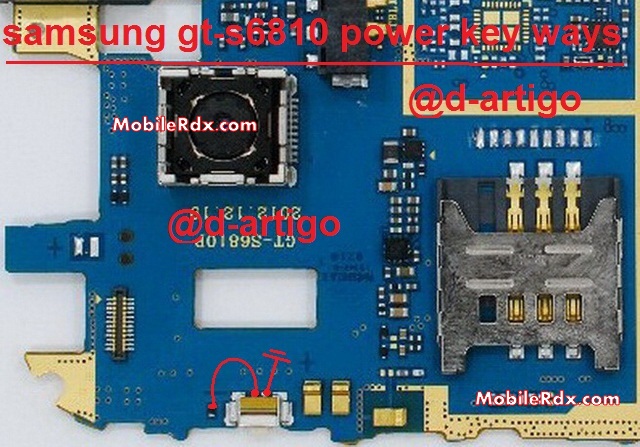
Credit To d-artigo
Please
Note that we will edit these solutions or add new ones if found in this
page at any time in the future. So feel free to come back any time on
this page to stay up to date.
Galaxy Fame S6810 Power Switch Ways Problem Jumper
If you have further questions please don’t hesitate to leave a comment.
Note:
Every repairing solution posted here is tested by at least one member
of our team. Use the information available here at Your Own Risk. We are
not responsible if any harm comes to your device during the repairing
process.
The post Galaxy Fame S6810 Power Switch Ways Problem Jumper appeared first on MobileRdx.com.
Comments
Post a Comment